Pink Poogle Toy Forum

The official community of Pink Poogle Toy. Bear with me while I tweak everything
It is currently Thu Sep 17, 2026 9:14 am

All times are UTC


Post new topic  This topic is locked, you cannot edit posts or make further replies.  [ 8 posts ] 
Author Message
 Post subject: Windows problems
PostPosted: Wed Jun 21, 2006 6:15 pm 
Beyond Godly
Beyond Godly
Offline

Posts: 2514
Joined: Sun Mar 06, 2005 10:35 am
Location: England
It all started when I tried to install Windows Service Pack 2 - and went downhill from there.

You see, I wished to explore the new IE Beta 7, but needed SP2 (unaware I did not have), so, I tried to download it, but some errors cropped up. No worries, I thought, I'll just get it off another site, so I did.

Firstly - the installation froze, so I restarted my computer. It was installed, but, Automatic Updates would not work (and still have not), if I try, I get a Not Responding error - leaving it for, say, an hour, does no good.

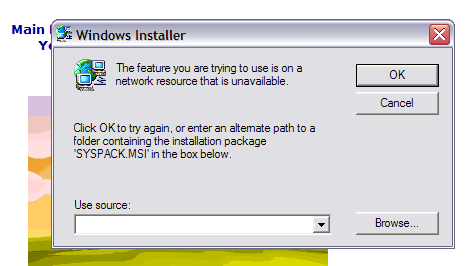
Then, my biggest problem, whenever, say, I open Live Messenger, close a window, open one, someone talks to me, or I open IE7, I get this rather annoying error message:

Image

What could I do to remedy my situation?

Thanks, Tom.

_________________
Image
Click the wonderful signature. You know you want to.


Top
 
   
 Post subject:
PostPosted: Wed Jun 21, 2006 6:27 pm 
PPT Trainee
PPT Trainee
Offline

Posts: 703
Joined: Mon Sep 19, 2005 7:07 am
Location: England
Reinstall SP2, if the installation froze some files may have not been copied over correctly.


Top
 
   
 Post subject:
PostPosted: Wed Jun 21, 2006 7:24 pm 
Beyond Godly
Beyond Godly
Offline

Posts: 2514
Joined: Sun Mar 06, 2005 10:35 am
Location: England
I'll try it - but I think this came up when I had IE7 installation and such on my desktop, no SP2, nothing had been installed.

I thought SP2 would fix it, but obviously hasn't. I will try again, though. I'll update later.

_________________
Image
Click the wonderful signature. You know you want to.


Top
 
   
 Post subject:
PostPosted: Wed Jun 21, 2006 7:39 pm 
PPT Trainee
PPT Trainee
Offline

Posts: 703
Joined: Mon Sep 19, 2005 7:07 am
Location: England
Pixa wrote:
I'll try it - but I think this came up when I had IE7 installation and such on my desktop, no SP2, nothing had been installed.

I thought SP2 would fix it, but obviously hasn't. I will try again, though. I'll update later.


Try reinstalling IE7 as well. :)


Top
 
   
 Post subject:
PostPosted: Sun Jun 25, 2006 5:22 am 
Beyond Godly
Beyond Godly
Offline

Posts: 3041
Joined: Thu Jun 03, 2004 5:27 am
Location: at the late night science fiction picture show
Pixa

Try uninstalling IE7. I've read on the microsoft forums that some people have had problems getting it to uninstall, so just be aware of that.

Then, once you've uninstalled that, try using CCleaner - scan for Issues just to get any pesky little bits and pieces that may still be floating around on the computer. Reboot. Then install SP2. If you have the disc for that and if you have XP SP1 you could try slipstreaming the discs into one - but that means reinstalling - which means you could lose everything - which means big time backups.

Anyway, once you get SP2 installed, go to windows update, get the latest updates, reboot then try the IE7.

_________________
Image Image


Top
 
   
 Post subject:
PostPosted: Sun Jun 25, 2006 6:06 pm 
Beyond Godly
Beyond Godly
Offline

Posts: 2514
Joined: Sun Mar 06, 2005 10:35 am
Location: England
Okay - things have gone pearshaped. I uninstalled SP2, it was okay, nothing fixed, but PC still worked, then I uninstalled IE7.

Now, when I log in I get the message:
Quote:
Windows Explorer has encountered a problem and needs to close. We are sorry for the inconvenience.


Quote:
Error Signature:
AppName: explorer.exe AppVer: 6.0.2800.1106 ModName: kernel32.dll
ModVer: 5.1.2600.1106 Offset: 0001b62f


Okay, taskbar isn't there, icons gone. I've only got here through Windows Task Manager. Everything is still there, but I can't get to any of it... basically, explorer.exe has crashed, it won't open, and now I can't do anything much.

I'd think about doing a factory restore - if all my files that I wanted were safe, and I could keep them on the network I share with my brother, but I can't open any folders.

Can anyone help dig me out of this seeming deeper hole?
Thanks.

_________________
Image
Click the wonderful signature. You know you want to.


Top
 
   
 Post subject:
PostPosted: Sun Jun 25, 2006 8:57 pm 
PPT Trainee
PPT Trainee
Offline

Posts: 507
Joined: Wed Jun 16, 2004 1:03 pm
You might want to just call Microsoft Support as they are usually helpful and know what they are doing. Or Geek Squad...

_________________
Image


Top
 
   
 Post subject:
PostPosted: Mon Jun 26, 2006 8:19 am 
Beyond Godly
Beyond Godly
Offline

Posts: 2514
Joined: Sun Mar 06, 2005 10:35 am
Location: England
Well, after about 10 attempts, I finally fixed it (my PC kept randomly shutting down). I had to go through Task Manager and re-install SP2. Everything seems to be okay now. At least I hope it is.

_________________
Image
Click the wonderful signature. You know you want to.


Top
 
   
Display posts from previous:  Sort by  
Post new topic  This topic is locked, you cannot edit posts or make further replies.  [ 8 posts ] 

All times are UTC


You cannot post new topics in this forum
You cannot reply to topics in this forum
You cannot edit your posts in this forum
You cannot delete your posts in this forum

Search for:
Jump to:  
Powered by phpBB® Forum Software © phpBB Limited