Pink Poogle Toy Forum

The official community of Pink Poogle Toy. Bear with me while I tweak everything
It is currently Wed Sep 16, 2026 3:49 am

All times are UTC


Post new topic  This topic is locked, you cannot edit posts or make further replies.  [ 11 posts ] 
Author Message
PostPosted: Fri Feb 02, 2007 1:14 am 
Beyond Godly
Beyond Godly
Offline

Posts: 2775
Joined: Fri Jul 02, 2004 11:45 am
Website: http://riverscape.cjb.net
Location: muhaha
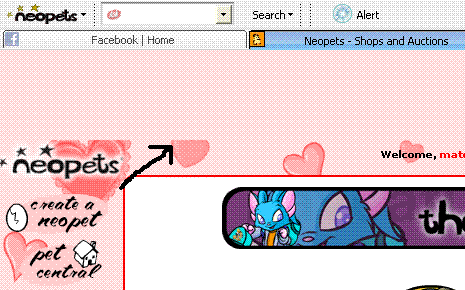
ok, so with adblock on firefox and some code in my userContent file in the chrome file, the ads are removed. but now a blank bar is at the top of the screen. this hasn't happened before, so i'm guessing it has something to do with my new firefox version.

here's the code that i used:
Code:
div.ban,div#ban, #ban, .ban, #ban_spacer {display: none !important;}


I installed the code according to this site's information:
http://www.thedailyneopets.com/articles/remove-neopets-ads/

And here's a screenie of what my page looks like:

Image

What can i do to fix this?

_________________
Image
Losers are those who do not try


Top
 
   
 Post subject:
PostPosted: Fri Feb 02, 2007 4:28 am 
PPT Trainee
PPT Trainee
Offline

Posts: 511
Joined: Wed Jun 16, 2004 9:55 pm
Location: Deep in the Forest
I hope someone answers this question soon. I'm vexed with the same problem... :(

_________________
Looking to buy Snowbunny Stamp and Sticky Snowflake Stamp. If you're selling, please PM me!


Top
 
   
 Post subject:
PostPosted: Fri Feb 02, 2007 4:35 am 
Honorary Member
Honorary Member
Offline

Posts: 3727
Joined: Sat Oct 16, 2004 12:12 am
Location: Lurking
I don't know if its the best way to do it, but I just added this filter to my Adblock Plus

#div(ban_spacer)

_________________
Image


Top
 
   
 Post subject:
PostPosted: Fri Feb 02, 2007 4:53 am 
Moderator
Moderator
Offline

Posts: 2898
Joined: Tue Dec 27, 2005 7:21 am
Location: Hakazura Temple
the_dog_god wrote:
I don't know if its the best way to do it, but I just added this filter to my Adblock Plus

#div(ban_spacer)


Doesn't work perfectly. Sometimes this will also get rid of the normal top bar, the one with NP, username, etc. on it.

However, this only lasts one page, so it's probably alright. I can ignore it.

_________________
Image

IDB Rater, Pink Inker


Top
 
   
 Post subject:
PostPosted: Fri Feb 02, 2007 8:06 am 
Beyond Godly
Beyond Godly
Offline

Posts: 2743
Joined: Mon May 31, 2004 3:55 pm
Location: PEI, Canada
http://neocolours.me.uk/forum/viewtopic.php?t=5283

zebru's instructions worked for me. Peoples' chrome folders can be in different places, so read through the whole thread and find the directions that work for you. :)

_________________
Image


Top
 
   
 Post subject:
PostPosted: Fri Feb 02, 2007 10:42 am 
Honorary Member
Honorary Member
Offline

Posts: 3727
Joined: Sat Oct 16, 2004 12:12 am
Location: Lurking
theonlysaneone wrote:
the_dog_god wrote:
I don't know if its the best way to do it, but I just added this filter to my Adblock Plus

#div(ban_spacer)


Doesn't work perfectly. Sometimes this will also get rid of the normal top bar, the one with NP, username, etc. on it.

However, this only lasts one page, so it's probably alright. I can ignore it.


Really? Never does that to me. Weird

_________________
Image


Top
 
   
 Post subject:
PostPosted: Fri Feb 02, 2007 11:07 am 
Beyond Godly
Beyond Godly
Offline

Posts: 4819
Joined: Thu Jan 06, 2005 6:22 am
Location: Somewhere outside of reality
In Firefox, I use Adblock Plus -
http://images.neopets.com/loading_*.gif
and
#div(ban_spacer)

This topic was brought up in General Chat not too long ago:

http://www.pinkpt.com/forum/viewtopic.p ... 74&start=0


Top
 
   
 Post subject:
PostPosted: Fri Feb 02, 2007 10:05 pm 
Beyond Godly
Beyond Godly
Offline

Posts: 2775
Joined: Fri Jul 02, 2004 11:45 am
Website: http://riverscape.cjb.net
Location: muhaha
by apparently no work of my own, it seems to be fixed. maybe restarting the computer made it work, maybe it's a special day, i'm not really sure.

anyway, thanks for the help guys

_________________
Image
Losers are those who do not try


Top
 
   
 Post subject:
PostPosted: Mon Feb 12, 2007 11:11 pm 
PPT Trainee
PPT Trainee
Offline

Posts: 703
Joined: Mon Sep 19, 2005 7:07 am
Location: England
Is this even allowed? I swear it was against Neopian rules to remove any advertisements.


Top
 
   
 Post subject:
PostPosted: Mon Feb 12, 2007 11:56 pm 
Beyond Godly
Beyond Godly
Offline

Posts: 2743
Joined: Mon May 31, 2004 3:55 pm
Location: PEI, Canada
It has never been against the rules to block ads. Adam even said so here when they first made the ad banner huge. It is only against the rules to use adblock to gain an in-game advantage -- say, by blocking the images of all unprofitable items in a shop so you can more quickly grab the good items while restocking.

_________________
Image


Top
 
   
 Post subject:
PostPosted: Tue Feb 13, 2007 1:55 am 
PPT Trainee
PPT Trainee
Offline

Posts: 703
Joined: Mon Sep 19, 2005 7:07 am
Location: England
Cranberry wrote:
It has never been against the rules to block ads. Adam even said so here when they first made the ad banner huge. It is only against the rules to use adblock to gain an in-game advantage -- say, by blocking the images of all unprofitable items in a shop so you can more quickly grab the good items while restocking.


Oh; I must have misread it then. o.O


Top
 
   
Display posts from previous:  Sort by  
Post new topic  This topic is locked, you cannot edit posts or make further replies.  [ 11 posts ] 

All times are UTC


You cannot post new topics in this forum
You cannot reply to topics in this forum
You cannot edit your posts in this forum
You cannot delete your posts in this forum

Jump to:  
Powered by phpBB® Forum Software © phpBB Limited